Healthcare Document Automation
What Is EHR Document Automation? A Practical Guide for Healthcare Operations
EHR document automation helps healthcare organizations turn paper, faxed, scanned, and digital records into structured, searchable data. This data supports EHR, billing, claims, coding, and records workflows. In this guide, we’ll break down what it is, why it matters, and where it fits in everyday work for healthcare operations teams.
What is EHR document automation?
EHR document automation is the use of technologies like Intelligent Document Processing (IDP), OCR, NLP, machine learning, and workflow automation to handle document-heavy work that feeds your EHR and related systems. Instead of relying on staff to read every page and re-key every field, automation captures key information. In addition, it also routes this data into the tools your teams already use.
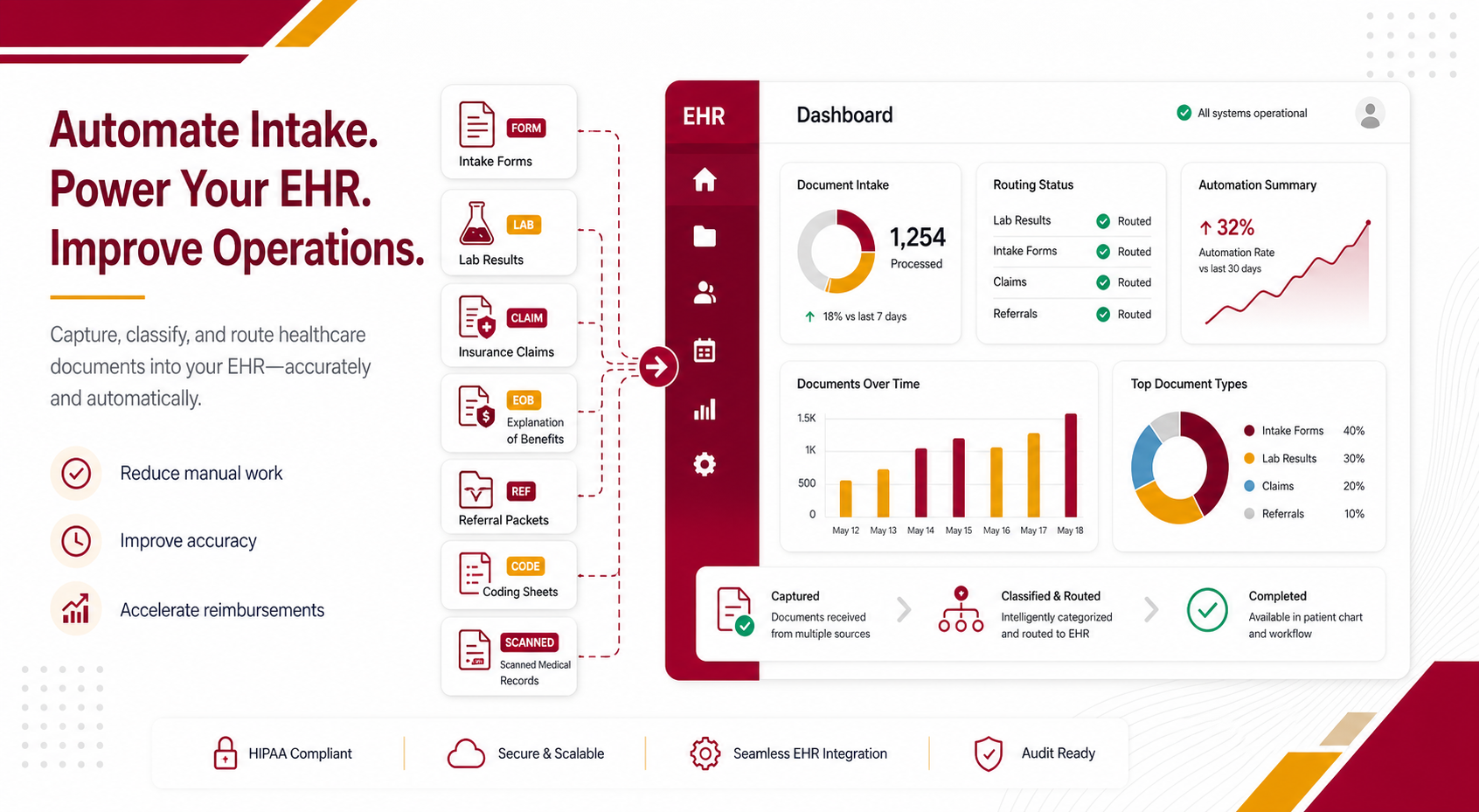
Typical EHR document automation projects focus on high-volume, repetitive workflows: intake forms, clinical documentation, lab results, referral packets, claims and EOBs, prior authorization paperwork, and coding sheets.
Why EHR document workflows slow healthcare teams down
Healthcare operations and coding teams are under pressure to process more information with fewer delays, fewer errors, and tighter compliance expectations. However, many documents that support the EHR still arrive as paper forms, faxes, scans, emailed attachments, lab reports, referral packets, claims paperwork, and handwritten or semi-structured records.
Without EHR document automation, those files often create expensive friction:
- Staff manually sort and identify incoming documents.
- Teams re-enter data into EHR, billing, claims, and records systems.
- Coding and revenue cycle work slows down when documents are incomplete, hard to read, or routed late.
- Claims and documentation errors create rework, follow-up, and reimbursement delays.
- Critical information gets trapped in unstructured files instead of becoming usable operational data.
How EHR document automation works with Intelligent Document Processing
Most EHR document automation initiatives are built on a foundation of Intelligent Document Processing. At a high level, IDP handles five core steps:
1. Capture incoming healthcare documents
Documents enter the process through mail, scanning, fax, email, uploads, portals, or digital intake channels. The goal is to capture every relevant document in a consistent digital workflow.
2. Classify EHR document types
Once captured, IDP identifies whether a file is an intake form, referral, lab report, clinical note, prior authorization packet, EOB, coding sheet, billing document, or another healthcare record. This classification step keeps documents from being misrouted or overlooked.
3. Extract the right healthcare data
The system pulls relevant fields such as patient details, provider information, diagnosis codes, procedure codes, insurance information, denial reasons, and other operational data points. Therefore, this is where automation starts to replace repetitive manual data entry.
4. Validate and flag exceptions
Business rules and human review steps can confirm accuracy, handle low-confidence fields, and reduce downstream errors before data enters critical healthcare systems. As a result, exceptions are surfaced for review instead of hidden in the workflow.
5. Route clean data into EHR workflows
Clean data and indexed documents are delivered into EHR, billing, claims, document management, and operational systems. Consequently, downstream teams can work faster with better visibility.
Common use cases for EHR document automation
EHR document automation is especially useful for high-volume, document-heavy processes that slow down operations, coding, claims, billing, and records teams. A few common examples:
Patient intake and registration
Automate intake forms, demographics, insurance cards, consent forms, referral packets, and supporting patient documentation. This ensures intake teams do less manual entry and records are easier to access downstream.
Clinical and medical record documentation
Process clinical notes, lab results, radiology notes, discharge summaries, referral letters, and other medical records. Therefore, information is easier to classify, find, and use inside operational workflows.
Claims, billing, and revenue cycle support
Extract data from claims packets, EOBs, billing statements, invoices, prior authorization paperwork, and coding sheets to help reduce errors, improve handoffs, and keep reimbursement workflows moving.
Coding and documentation workflows
Support medical coding and HIM teams by making relevant records easier to capture, organize, review, and connect to the right downstream processes.
Benefits of EHR document automation for healthcare operations
- Less manual data entry: Automation reduces repetitive document handling and re-keying so healthcare teams can focus on higher-value work.
- Faster processing times: Documents move from intake to downstream systems more quickly, helping teams accelerate coding, claims, and operational workflows.
- Improved accuracy: IDP can extract and validate data more consistently than purely manual workflows. This is especially true when paired with review rules and exception handling.
- Stronger reimbursement support: Cleaner document intake and better data flow can help reduce avoidable delays tied to incomplete or misrouted records.
- Better searchability and visibility: Structured, indexed records are easier to find, route, audit, and act on across departments.
- A more scalable workflow: As volume grows, automation helps organizations handle more documents without relying on manual workarounds to keep up.
Where to start with EHR document automation
If your teams are still spending a lot of time sorting documents, entering data by hand, chasing incomplete records, or managing EHR-related workflows across disconnected systems, it may be time to look at EHR document automation more closely.
Good first steps include mapping your current document flows, identifying where volume and manual work are highest. Then, explore how Intelligent Document Processing could support intake, coding, claims, and records teams.
To see how OMG approaches Intelligent Document Processing and healthcare document automation, you can explore our healthcare solutions, our Intelligent Document Processing service page, and our overview of how IDP changes everyday document work.